
Update: The AWS Security Hub team got in touch to clarify some of the points below, and get feedback to help customers avoid some of the gotchas herein. The resulting goodness has been sprinkled throughout the post, and we are grateful to AWS for being so proactive about security. <3
Welcome to some extremely niche AWS security content. If you are the kind of crazy that we are at Plerion, and you’ve decided to build a product that integrates with AWS Security Hub, this blog post is for the you. We made a mistake in our implementation, fixed it, and now you can too!
Security teams have a lot of security tools, too many tools. Luckily in 2019 our friends at AWS saved us from the agony of a thousand dashboards by creating a single dashboard to rule them all, at least for security issues related to AWS infrastructure.
aws securityhub enable-import-findings-for-product --product-arn arn:aws:securityhub:us-east-1::product/plerion/cloud-security-platformIt’s pretty snazzy actually.

I told you it was snazzy! You’ll know better than to doubt me next time.
If you’re on the other end of this pipe, building a scanner and generating highly valuable signal that is desperate to make its way to a dashboard, things are a little bit more complicated.
The customer has provided their consent for you to send them the goodies. But how how do you know where to send those goodies? Well naturally you ask:
Hello valued customer [Name], we have the best security issues to send to your Security Hub hub. Where is it?
Hottest Regards, Important Product PersonTweet
They respond by giving you their AWS account ID (which is actually unnecessary because typically findings should just go to the account they relate to) and you smoosh it into your security scanning machine. It purrs like a kitten, generating goodies. Like clockwork (usually 2-5 minutes later) the goodies end up on the customer’s dashboard. Everyone erupts in euphoric cheer as another happy customer has solved their cloud security problems.
But what if the customer went on a bender the night before, and instead of giving you their current account ID, they accidentally give you their old employer’s account ID that they diligently memorized during a battle to the death with CloudFormation? If their old employer hasn’t clicked “accept findings” then not much happens.
If their old employer has clicked “accept findings” at any point, this results in what the big dogs in cybersecurity intelligentsia call a ‘confused deputy‘.
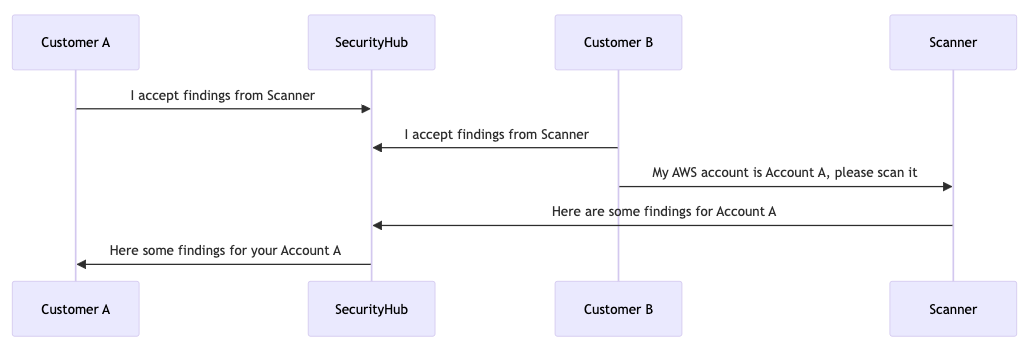
Many customers have authorized your platform to send them findings but the platform hasn’t validated ownership of the accounts where the findings are being sent. So whether intentionally or maliciously, the one customer’s findings are being sent to another customer.
Note: For the moons to align in this way, the user controlled account ID has to end up in the call to BatchImportFindings.
The security implications of this aren’t earth shattering but they do exist. An attacker could sign up to your scanning service and use it to pollute someone else’s Security Hub hub. Security folk have enough false positives and irrelevant noise to deal with already, without having to deal with intentionally irrelevant and misleading data.
The more important implication is the loss of trust a security product would face if it were the cause of such cross-tenant data pollution. It’s just not a good look. The sheriff would not be happy with this deputy. Luckily, as part of the integration process with the Security Hub team, correct generation and sending of findings to the right accounts is reviewed before go live. However, life happens, code and people change over time, and it is important to note that if code changes happen past the initial integration, this problem can occur.
Turns out there’s more niche minutiae to think about. Who knew?
Let’s say a customer is a big nerd like me and likes to do things through the cli instead of the web console. Instead of navigating through a visual list of products and clicking “accept findings”, they could do something like:
aws securityhub enable-import-findings-for-product --product-arn arn:aws:securityhub:us-east-1::product/plerion/cloud-security-platformBut how would they know what product ARN to provide to the command? Well they would first have to run:
aws securityhub describe-productsWhich would return a big ol’ json blob that looks something like this:
{
    "Products": [
        ...
        {
            "ProductArn": "arn:aws:securityhub:us-east-1:123456789012:product/plerion/cloud-security-platform",
            "ProductName": "Cloud Security Platform",
            "CompanyName": "Plerion",
            "Description": "Plerion is a Cloud Security Platform with a unique threat-led, risk-driven approach offering customer preventative, detective, and corrective action across their workloads. Plerion's integration with Security Hub allows customers to centralize and act upon their security findings in one place.",
            "Categories": [
                "Cloud Security Posture Management (CSPM)",
                "Asset Management",
                "Threat Modeling"
            ],
            "IntegrationTypes": [
                "SEND_FINDINGS_TO_SECURITY_HUB"
            ],
            "MarketplaceUrl": "https://aws.amazon.com/marketplace/seller-profile?id=464b7833-edb8-43ee-b083-d8a298b7ba08",
            "ActivationUrl": "https://au.app.plerion.com/resource-center/platform-documentation/integrations/outbound/securityHub",
            "ProductSubscriptionResourcePolicy": "{...}"
        },
        <more products here>
        ...
     ]
}
This is a call anyone with an AWS account needs to be able to make. What is returned is essentially public. So now your ProductArn is public and if it includes your AWS account ID (it stopped being included in 2019), that too is public.
That’s not all, in order to scope which Account IDs can act on your product’s behalf to send findings, and which account IDs can enable your product, AWS kindly produces the IAM policy used to enforce this scoping inside the ProductSubscriptionResourcePolicy parameter.
Unescaping the parameter produces JSON that looks something like this:
{
  "Version": "2012-10-17",
  "Statement": [
    {
      "Effect": "Allow",
      "Principal": {
        "AWS": "123456789012"
      },
      "Action": [
        "securityhub:BatchImportFindings"
      ],
      "Resource": "arn:aws:securityhub:us-east-1:123456789012:product-subscription/plerion/cloud-security-platform",
      "Condition": {
        "StringEquals": {
          "securityhub:TargetAccount": "123456789012"
        }
      }
    },
    <more statements here>
    ...
  ]
}
Now not only is your one main account ID being leaked but a whole bunch of other account IDs you probably use for development and testing of the integration. Again, the world is not ending but it’s not ideal. AWS is looking into ways it can prevent this or at minimum make the implications clear in documentation.
If you like one liners, here is how you get the account IDs of all of your favourite AWS security products:
aws securityhub describe-products | jq '.Products[] | {CompanyName: .CompanyName, ProductName: .ProductName, AccountId: (.ProductArn + " " + .ProductSubscriptionResourcePolicy) | scan("\\d{12}")}'The awesome fwd:cloudsec team maintains an open source list of known AWS account IDs and their owners here.
Mostly but there are just a couple of other quirks that may some implication in even more niche scenarios.

Congratulations on making it this far. You are amongst the 0.00000001% of the earth’s population who is either building an AWS SecurityHub integration or likes cloud security content so much you couldn’t help yourself. As a reward, here are the practical steps you can take to protect yourself against the oddities described above.
You might also enjoy our no-longer-vulnerable-to-any-of-this-nonsense Plerion Cloud Protection Platform, which integrates securely with SecurityHub.


